Reduce reading time
Start with the central ideas of a long source before deciding which sections need a full review.
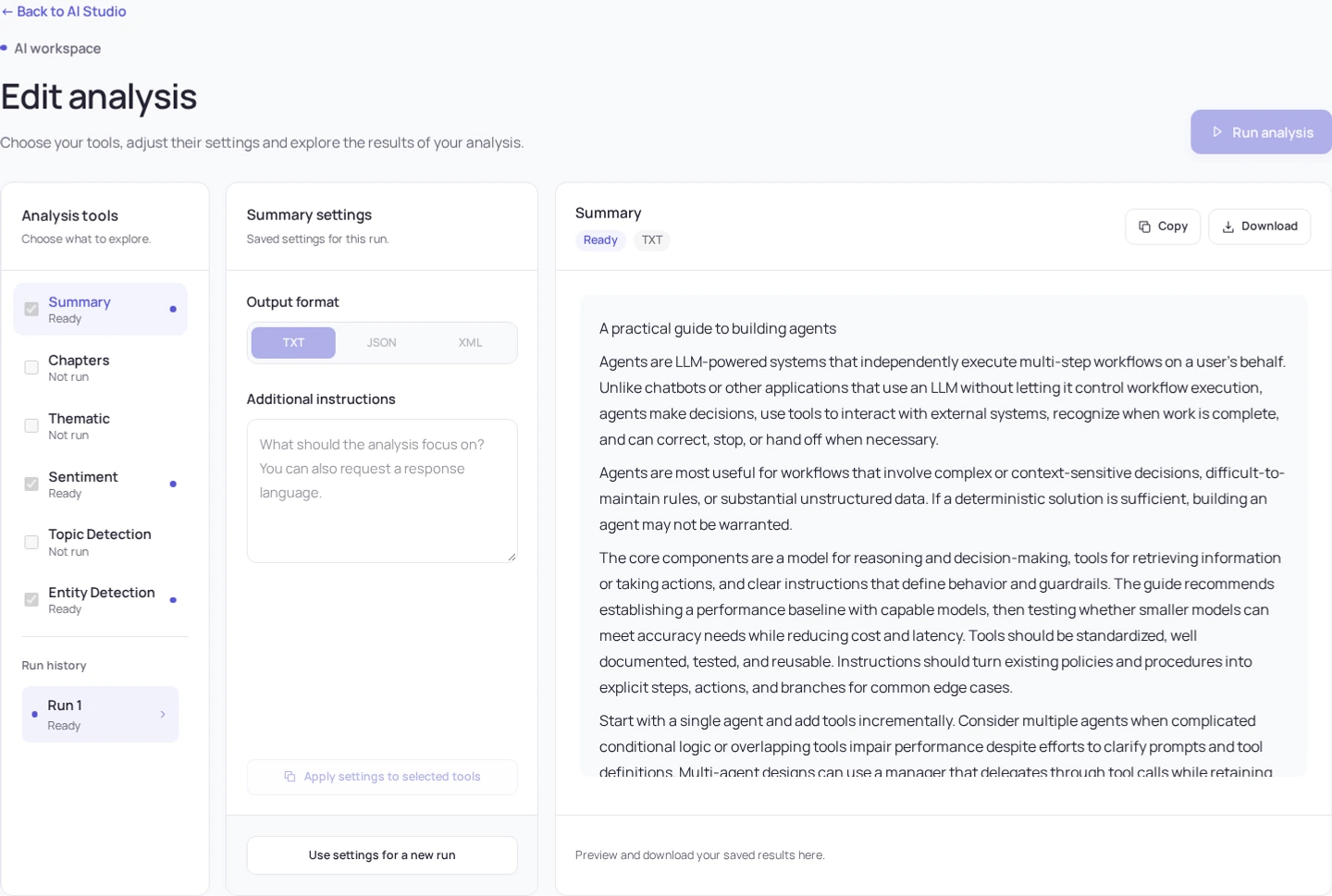
Create AI summaries from documents, transcripts and translations. Add instructions, review the main ideas and download TXT, JSON or XML results.
Start with the central ideas of a long source before deciding which sections need a full review.
Ask for the audience, level of detail or questions your summary should address.
Choose a readable TXT summary or structured JSON and XML for your next workflow.
Summarise interview transcripts, meeting recordings after transcription, course material or uploaded documents. Use instructions to request a concise overview or a more detailed account of selected points. Check quotations, figures and conclusions against the source.
Explore all questionsSelect a document, transcript or translation in AI Studio.
Select this tool, add instructions and choose TXT, JSON or XML.
Inspect the result against your source before downloading it.
Transcribe the recording first, then select that transcript in AI Studio. You can also upload a supported document.
Upload TXT, DOC, DOCX, PDF, XLS or XLSX, or use an existing transcript or translation.
Yes. Add tool instructions and choose TXT, JSON or XML, with a desired structure for JSON and XML. Tool availability depends on your plan.
Choose a service in the application or browse every feature and workflow.