Build your cast
Add named speakers and assign different available voices to distinguish each part.
Create AI dialogue with multiple speakers. Assign a voice to each character, arrange speaking turns and generate a downloadable conversation from your script.
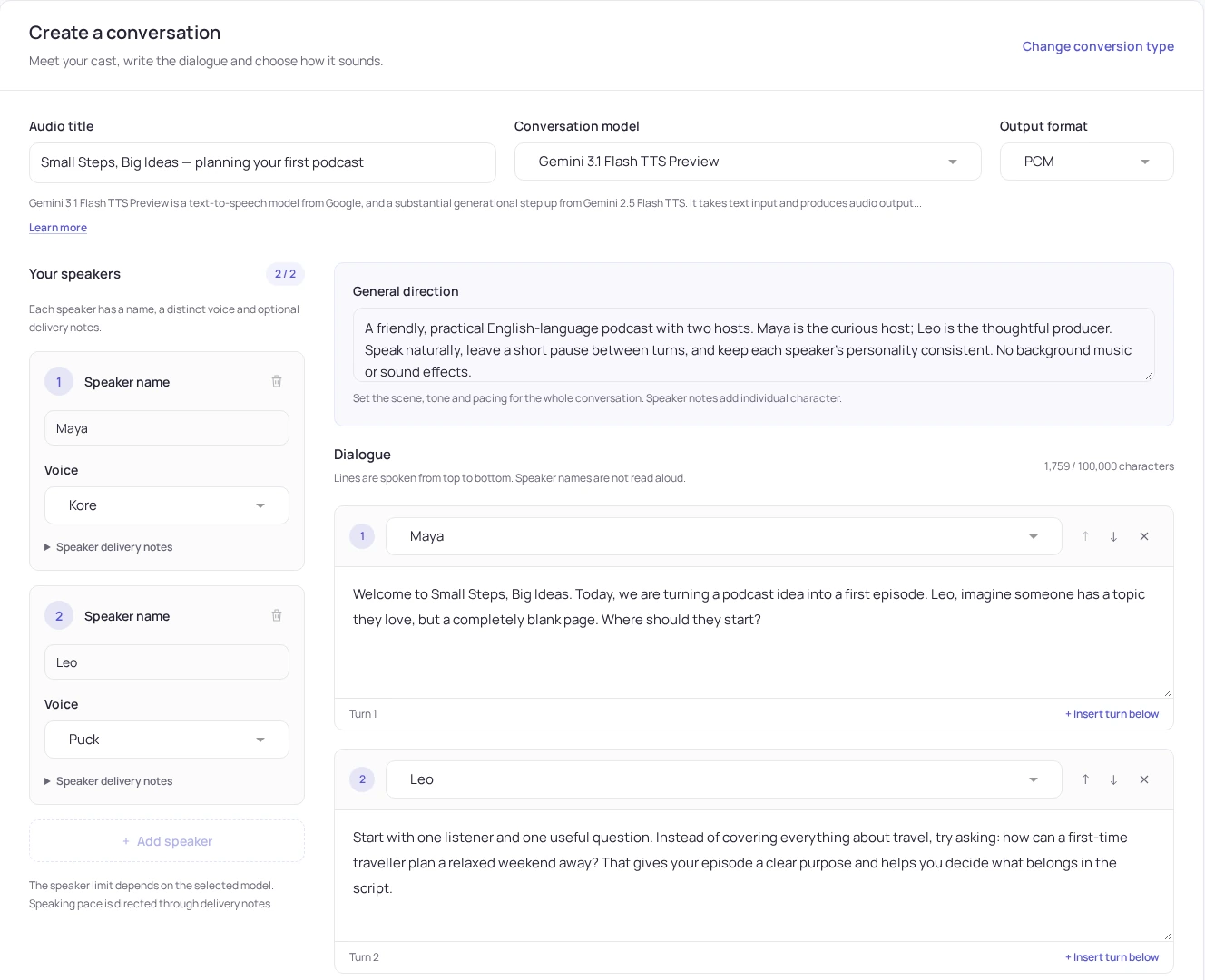
Add named speakers and assign different available voices to distinguish each part.
Arrange dialogue as speaker turns rather than combining every line into one narrator.
Add speaker instructions where the model supports them, then review the full generated conversation.
Use multi-speaker generation for teaching dialogues, podcast concepts and character conversations. The application shows models that support multiple voices and enforces the selected model’s speaker limit. Multi-speaker generation uses the model’s default speed.
Explore all questionsSelect multi-speaker conversion and a model with at least two supported speakers.
Name speakers, select their voices and build the dialogue in sequence.
Listen to the audio and adjust wording or speaker instructions before downloading.
No. The available cast size and voices depend on the model selected in the multi-speaker editor.
Multi-speaker conversions use the model’s default speed. Speed selection applies to supported single-speaker conversions.
This workflow uses the voices offered by the selected model. It does not provide a voice-cloning upload tool.
Choose a service in the application or browse every feature and workflow.